How to Use Your Own AI API Key
Run custom LLMs for stock analysis in 5 simple steps - bind GPT-4o, Claude, Gemini, or any OpenAI-compatible model to your TradingAgents workflow.
If you've been using TradingAgents - the open-source multi-agent AI trading framework that simulates a full Wall Street analyst team - you might have wanted to use your own preferred LLM instead of the platform's default models.
TradingAgents lets you bind your own AI API keys in 5 simple steps, so you can use GPT-4o, Claude 3.5 Sonnet, Gemini 1.5 Pro, open-source models like Llama 3, or even self-hosted models - all while keeping your API keys and trading data private, and saving on subscription costs.
What You'll Need Before Starting
- An active TradingAgents account (sign up free at tradingagents.cc)
- An API key from your preferred LLM provider:
- OpenAI (GPT-4o, GPT-4o Mini): Get from OpenAI Platform
- Anthropic (Claude 3 Opus/Sonnet): Get from Anthropic Console
- Google Gemini: Get from AI Studio
- Any OpenAI-compatible endpoint (Ollama, LocalAI, self-hosted models)
- Make sure your API key has available credits and is not restricted by IP.
Open Model Management from the Analysis Page
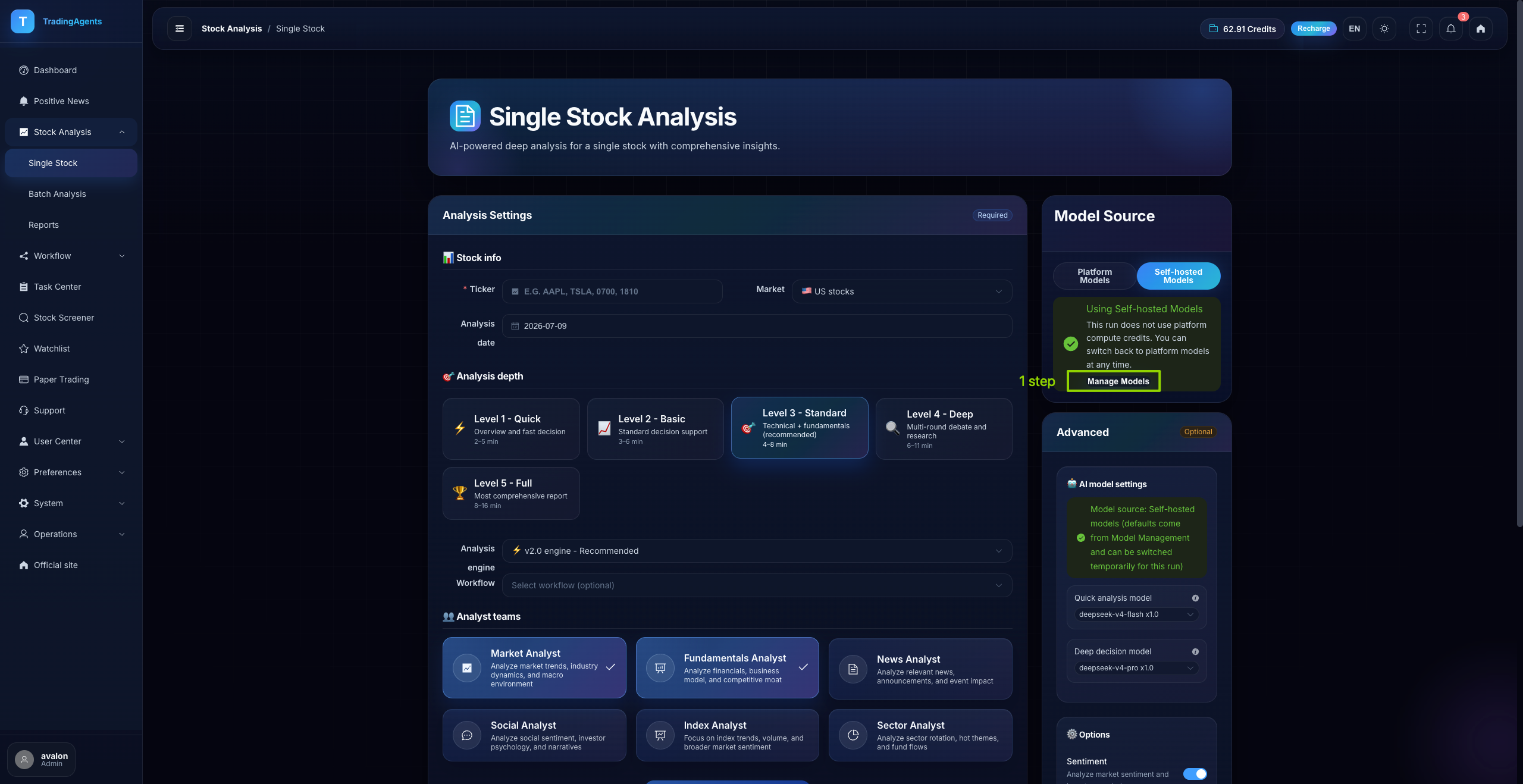
First, log into TradingAgents and open the Single Stock Analysis (or any analysis tool) from the left sidebar. On the right side of the screen, you'll see the Model Source panel. Click the Manage Models button to enter the model configuration dashboard.
Add a New Model Provider
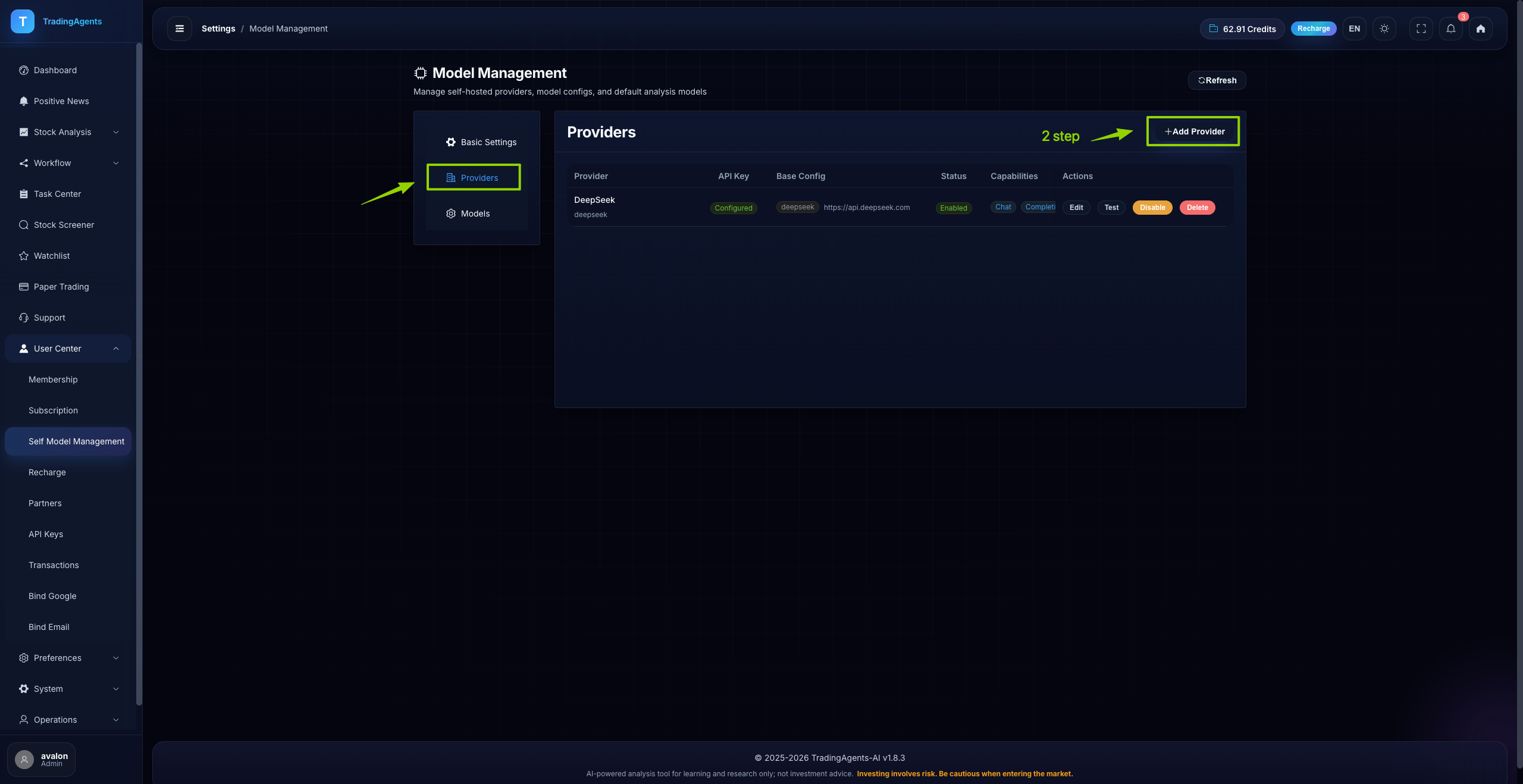
You'll now be on the Model Management page. Select Providers from the left sidebar menu, then click the + Add Provider button in the top right corner to add your LLM provider.
Enter Your API Key & Create the Provider
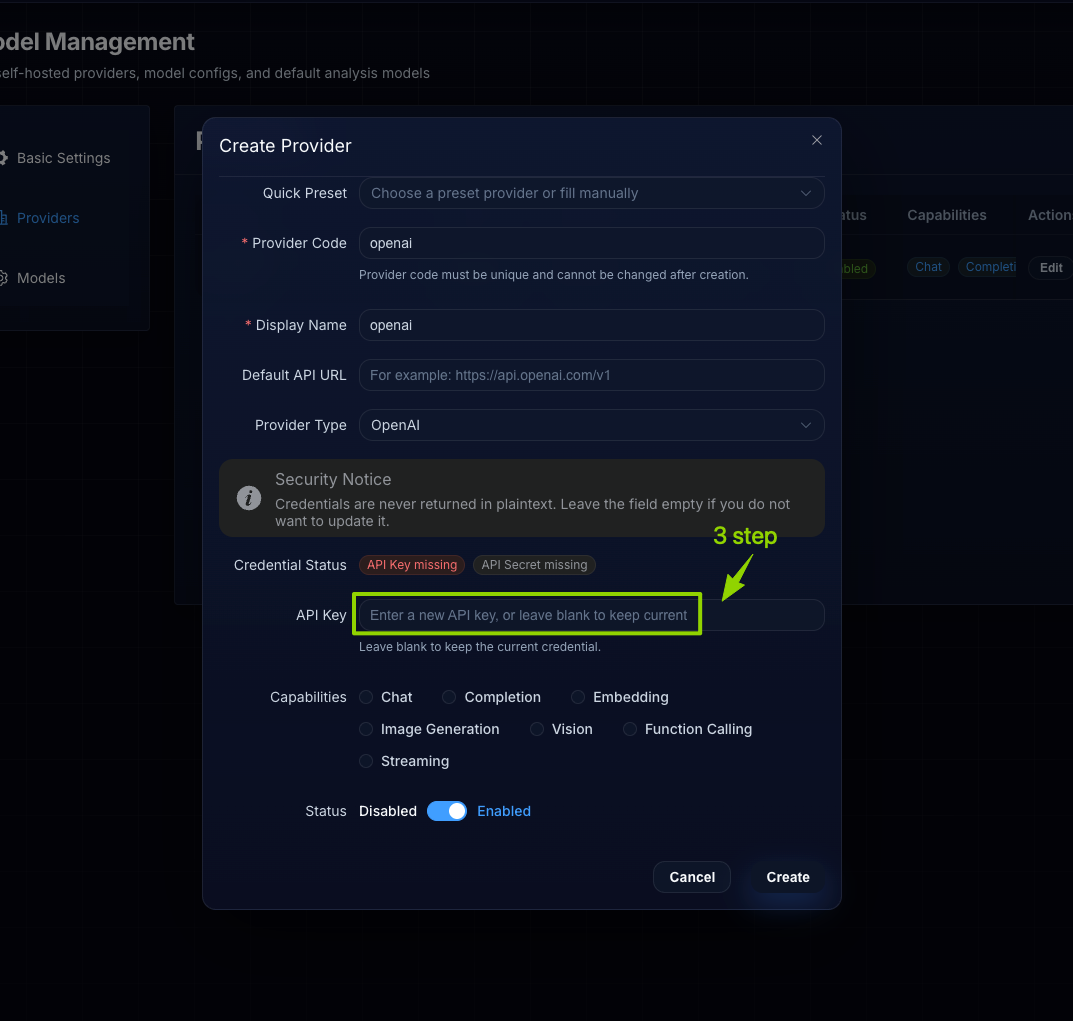
In the Create Provider popup:
- Select a quick preset (like OpenAI, Anthropic) or fill in custom details for self-hosted providers
- The Provider Code and Display Name auto-fill for presets; add a unique name for custom providers
- Paste your API key into the API Key field
- Leave the Default API URL as-is for major providers; for custom or self-hosted models, enter your endpoint URL
- Verify the credential status shows valid, then click Create
🛡 Security Note
Your API keys are encrypted at rest and only used to call LLM APIs directly from your session - TradingAgents never stores your keys in plaintext or uses them for any purpose other than running your analysis.
Add Your Specific Model Version
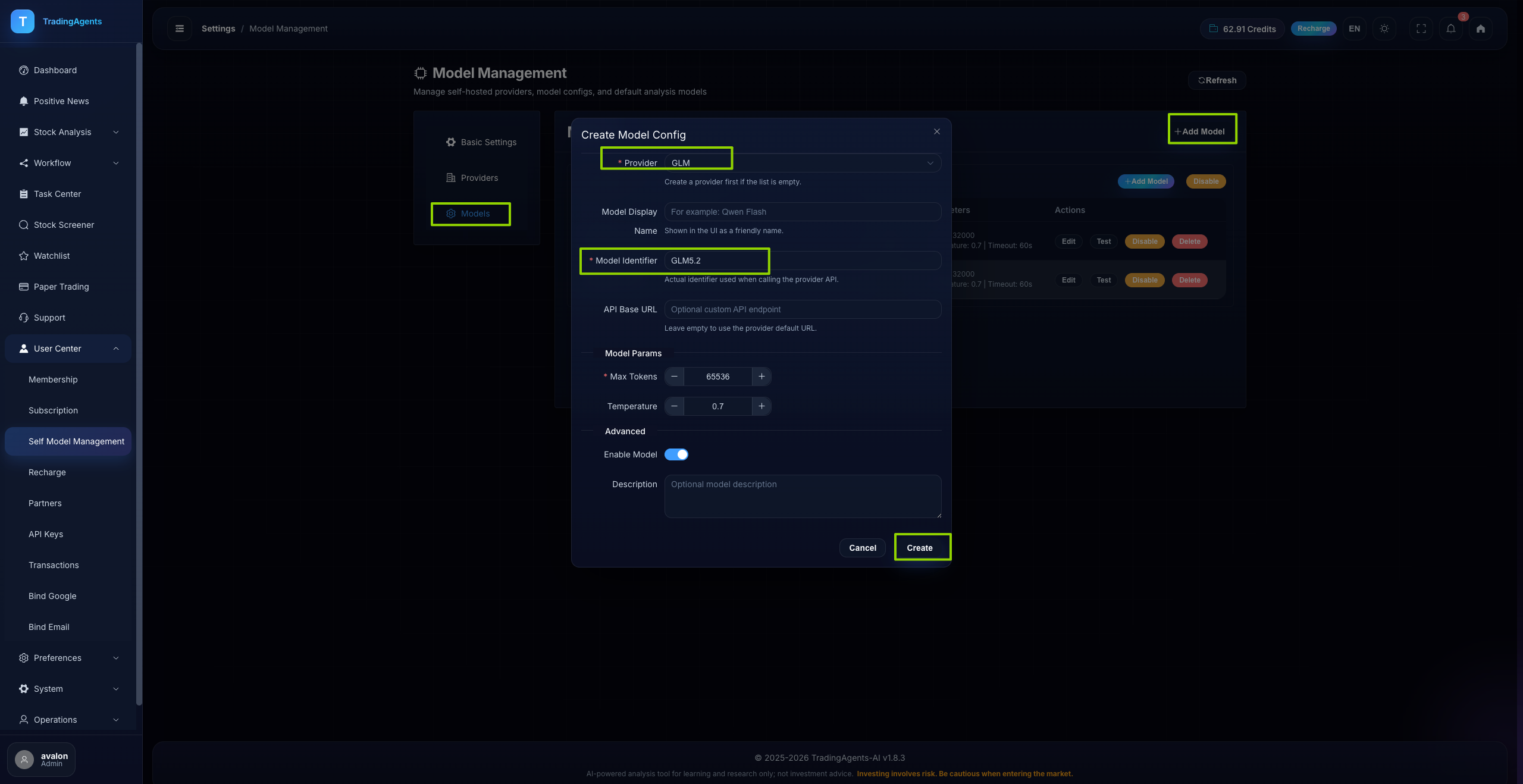
After creating the provider, go back to Model Management. Click + Add Model in the top right. In the Create Model Config popup:
- Select the provider you just created from the Provider dropdown
- Enter the exact model identifier in the Model Identifier field
(e.g. gpt-4o-2024-05-13, claude-3-5-sonnet-20240620, llama3:70b) - (Optional) Adjust model parameters like max tokens, temperature, and enable streaming
- Click Create to save the model
Select Your Custom Model & Start Analyzing
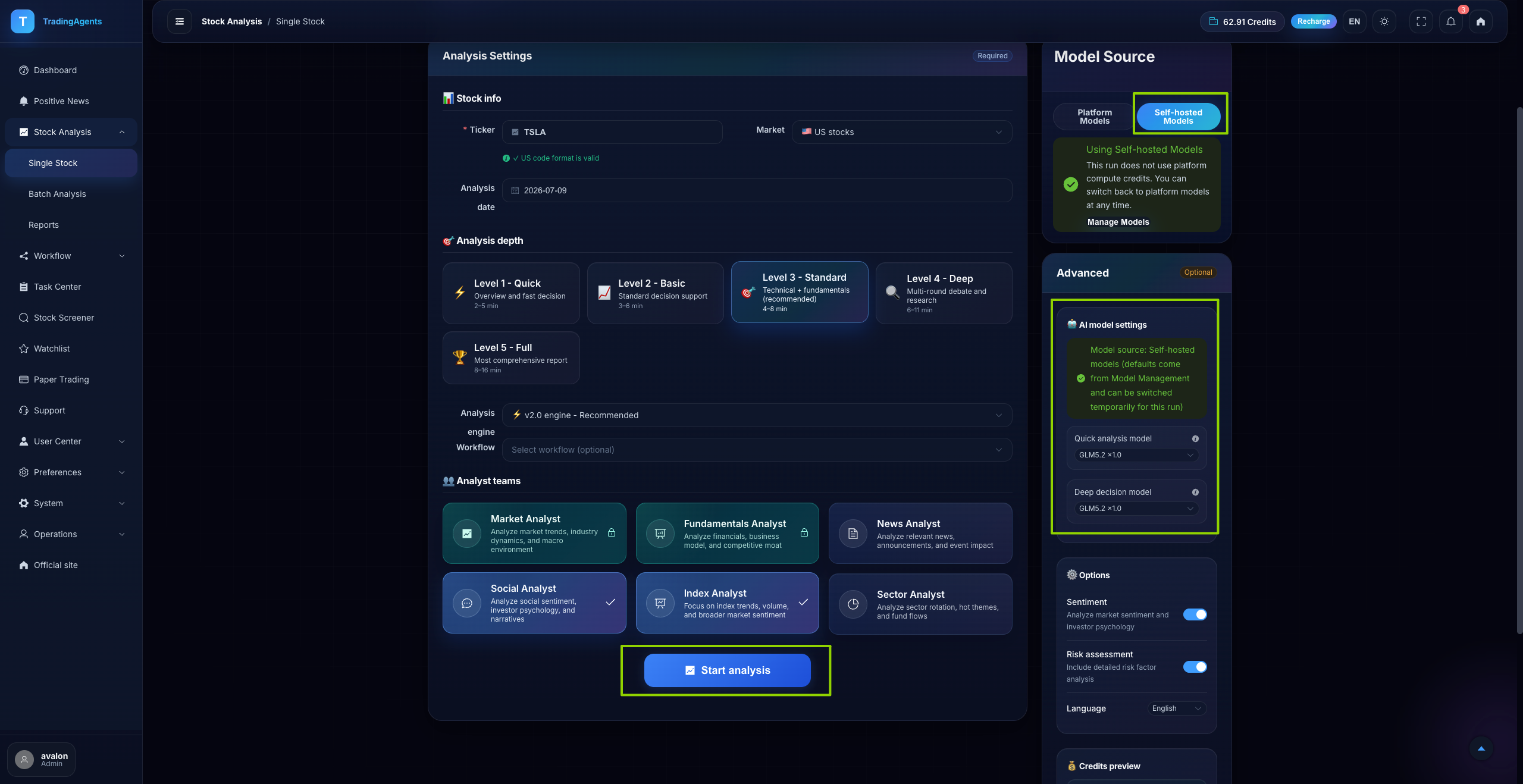
Go back to Single Stock Analysis. In the right Model Source panel:
- Select Self-hosted Models (where your custom API-bound models live)
- Use the dropdown menu to select the custom model you just added
- Configure your analysis settings (ticker, depth, analyst teams) as normal
- Click Start analysis - TradingAgents will now run the entire multi-agent analysis workflow using your own API key and custom LLM.
Frequently Asked Questions
Can I add multiple API keys and models?
Yes. You can add as many providers and models as you want, and switch between them in one click before running any analysis. You can even use different models for different tasks, such as GPT-4o for technical analysis and Claude 3 Opus for fundamental research.
Will TradingAgents charge me extra for using my own API key?
No. When you use your own API key, all LLM costs are billed directly from your provider (OpenAI, Anthropic, and others) - TradingAgents does not add any markup or extra fees for custom model usage.
I get an "Invalid API Key" error. What should I do?
- Double-check that you copied your API key correctly, with no extra spaces or missing characters
- Verify your API key has available credits or billing set up with your provider
- Make sure your IP is not blocked by the provider, and that you have not restricted the key to specific apps
- For custom endpoints, confirm your API URL is correct and the endpoint is reachable
Can I use local or open-source models running on my own machine?
Absolutely. Any endpoint that uses the OpenAI-compatible API format works - including Ollama, LocalAI, text-generation-webui, and self-hosted LLM deployments. Just enter your local endpoint URL in the Default API URL field when creating the provider.
Can I set my custom model as the default for all analysis?
Yes. After adding your model, go to Model Management > Models, click the "Edit" button next to your model, and set it as the default analysis model.
Start Building Your Own AI Trading Team
Using your own API key gives you full control over your AI trading analysis: better privacy, lower costs, and the freedom to use whatever LLM works best for your strategy.